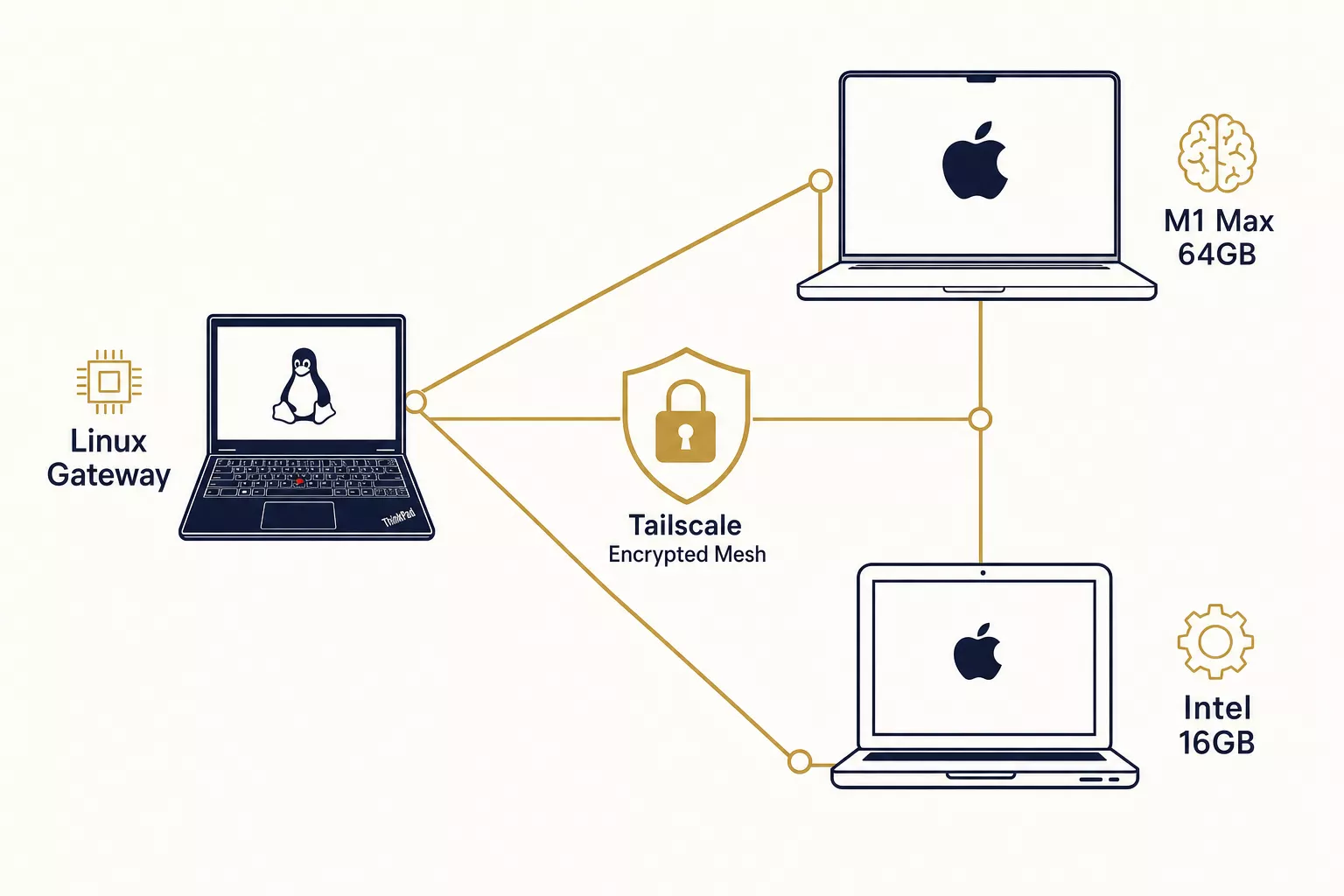
We're running DeepSeek R1, Devstral 24B, and Qwen3 across a ThinkPad laptop and two MacBooks. The machines sit in different locations, connected over a private mesh network. Total inference cost: zero dollars per month.
This isn't a toy setup. It's the backbone of Avyay's intelligence platform — the same infrastructure that powers our AI agents, knowledge graph, and product development pipeline.
Here's exactly how we built it, what went wrong, and what we learned.
The Problem with API-Only AI
If you're building AI agents, you're probably routing every task through Claude, GPT-4, or Gemini. It works. It's also expensive.
A typical agentic workflow might involve:
- A main reasoning session (Claude Opus: ~$15/M tokens)
- 3-4 coding sub-agents per task (Sonnet: ~$3/M tokens)
- Document processing and summarization
- Background research and analysis
Run this for a day of active development and you're burning $20-50 in API costs — for a single developer. Scale to a team, and the math gets ugly fast.
The instinct is to move everything local. But that introduces a different problem: no single consumer machine can run all the models you need. A 27B parameter model needs ~17GB of RAM. A 24B coding model needs ~14GB. Stack them up and you need 40-60GB just for models, before your OS and applications take their share.
Unless you distribute the work.
The Architecture: One Node, One Model, One Job
The idea is simple: instead of running everything on one machine, give each machine a single model that matches its hardware profile. Then connect them over a private network so any machine can call any other machine's model.
┌──────────────────────────────────────────────────┐
│              Tailscale Mesh Network               │
│           (Private, encrypted, NAT-free)          │
│                                                   │
│  ┌──────────────┐  ┌──────────────┐              │
│  │ Linux Gateway│  │   MacBook    │              │
│  │ ThinkPad X1  │  │   Pro (M1    │              │
│  │              │  │   Max 64GB)  │              │
│  │ qwen3.5:4b  │  │              │              │
│  │ (triage)    │  │ Qwen3 27B   │              │
│  │              │  │ Devstral 24B│              │
│  │ + Claude API │  │ (general +  │              │
│  │ + Codex API  │  │  coding)    │              │
│  │ (main brain) │  │              │              │
│  └──────┬───────┘  └──────┬───────┘              │
│         │                 │                       │
│         │    ┌────────────┘                       │
│         │    │                                    │
│  ┌──────┴────┴──┐                                │
│  │  MacBook Pro │                                │
│  │  (Intel i7   │                                │
│  │   16GB)      │                                │
│  │              │                                │
│  │ DeepSeek R1  │                                │
│  │ 7B           │                                │
│  │ (reasoning)  │                                │
│  │              │                                │
│  │ + Codex CLI  │                                │
│  └──────────────┘                                │
└──────────────────────────────────────────────────┘
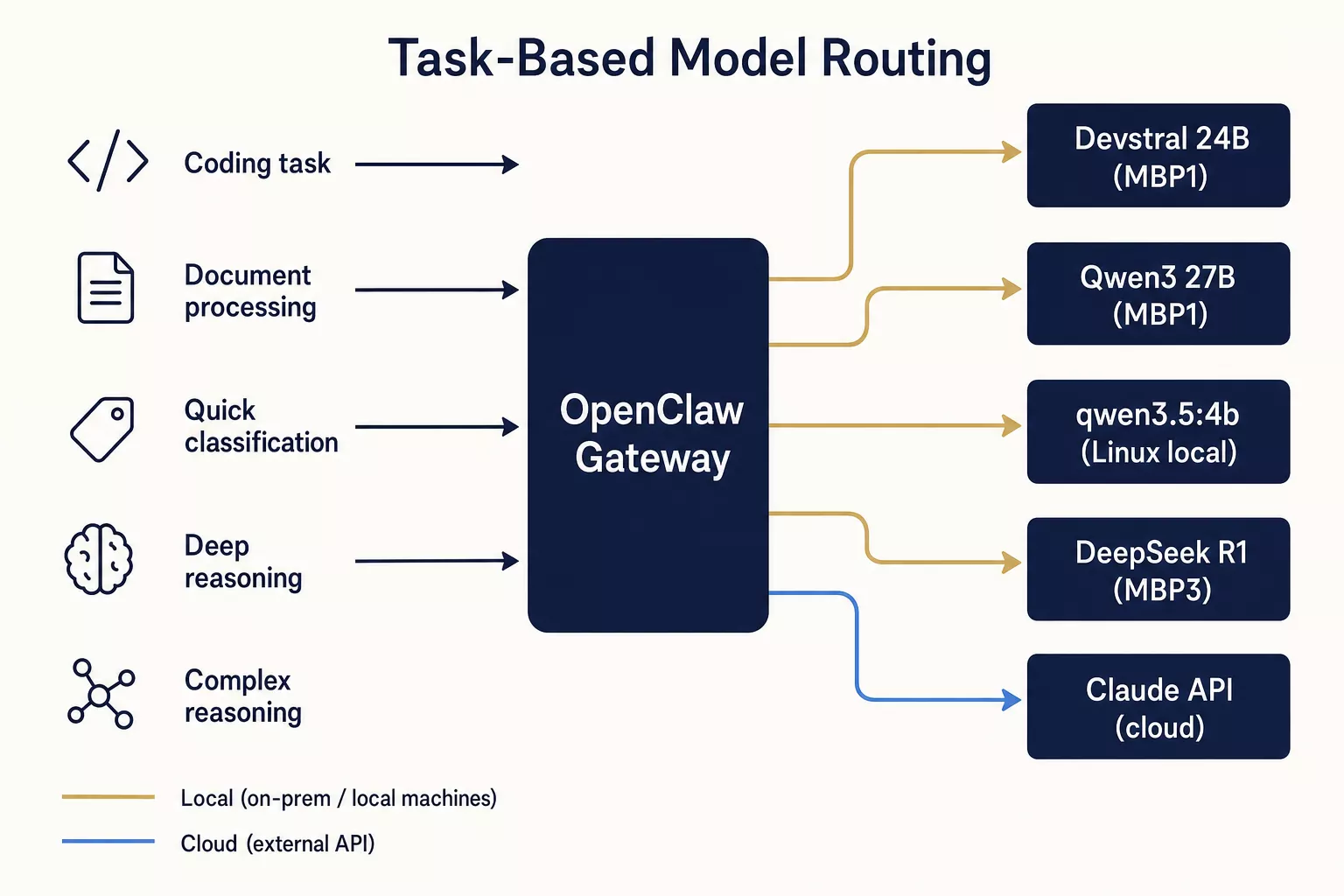
Each node runs Ollama as its inference server, listening on port 11434. Ollama provides an OpenAI-compatible API, so any node can query any other node's model with a simple HTTP call.
The routing logic lives on the Linux gateway, which acts as the orchestration hub. It decides which model handles which task:
| Task Type | Routes To | Model | Why |
|---|---|---|---|
| Main reasoning | Claude API | Opus 4 | Complex reasoning needs the best |
| Coding | Codex API / Devstral 24B | API or local | Heavy coding via API, routine via local |
| Document processing | MBP1 | Qwen3 27B | Fast Metal inference, great at summarization |
| Background reasoning | MBP3 | DeepSeek R1 7B | Slow but thorough chain-of-thought |
| Quick triage | Linux local | qwen3.5:4b | Sub-second classification |
The key insight: local models aren't about replacing APIs. They're about tiered intelligence. You don't hire a surgeon to take your blood pressure. You don't need Claude Opus to classify whether a message is a question or a command.
Hardware: What We're Actually Working With
No cloud instances. No rented GPUs. Just machines we already owned.
Node 1: Linux Gateway (ThinkPad X1 Extreme Gen 2)
| Spec | Value |
|---|---|
| CPU | Intel i7-9850H (6 cores, 2.6GHz) |
| RAM | 30GB DDR4 |
| GPU | NVIDIA GTX 1650 Max-Q (4GB VRAM) |
| Role | Orchestration hub + lightweight local model |
| Model | qwen3.5:4b (3.4GB) |
This is the brain of the operation — not because it's the most powerful, but because it runs the orchestration layer (OpenClaw), the knowledge graph (PostgreSQL + Apache AGE), and all the API routing. The GTX 1650 can accelerate small models that fit in its 4GB VRAM.
Node 2: MacBook Pro (Apple M1 Max, 64GB)
| Spec | Value |
|---|---|
| Chip | Apple M1 Max |
| RAM | 64GB Unified Memory |
| GPU | 32-core Metal GPU |
| Role | Primary inference node |
| Models | Qwen3 27B (~17GB) + Devstral 24B (~14GB) |
This is the workhorse. The M1 Max's unified memory architecture means the GPU has direct access to all 64GB — no PCIe bottleneck, no VRAM limit. Both models (~31GB total) fit comfortably with 33GB of headroom for the OS.
Expected inference speed: ~15-25 tok/s on Metal for 27B models. That's fast enough for interactive use.
Node 3: MacBook Pro (Intel i7-4980HQ, 16GB)
| Spec | Value |
|---|---|
| CPU | Intel i7-4980HQ (4 cores, 2.8GHz) |
| RAM | 16GB DDR3 |
| GPU | Intel Iris Pro (no ML acceleration) |
| Role | Background reasoning + build station |
| Model | DeepSeek R1 7B (~4.7GB) |
| Also | Codex CLI (API coding agent) |
A 2014-era MacBook. No Metal, no CUDA. Pure CPU inference at ~5 tokens/second. Not fast — but fast enough for background tasks that don't need to be interactive.
We also installed Codex CLI here, creating a unique setup: Codex (API) writes code, DeepSeek R1 (local) reviews it. Two different "brains" checking each other's work on the same machine.
The Networking Layer: Tailscale
The machines aren't on the same network. They're in different physical locations. This is where Tailscale comes in.
Tailscale creates a WireGuard-based mesh VPN across all your devices. Each device gets a stable IP address in the 100.x.x.x range that works regardless of NAT, firewalls, or physical location. Setup takes about 60 seconds per device.
For our setup:
Linux Gateway:  100.98.99.61
MacBook Pro 1:  100.105.159.80
MacBook Pro 3:  100.97.242.71
Each node's Ollama instance binds to 0.0.0.0:11434, making it accessible to any other node on the Tailscale network. The Linux gateway's firewall (ufw) blocks all external traffic but allows everything on the tailscale0 interface — so the outside world can't reach the models, but any Tailscale device can.
Cross-node inference is a single curl call:
# From the Linux gateway, query the MacBook's model:
curl http://100.97.242.71:11434/api/generate -d '{
  "model": "deepseek-r1:7b",
  "prompt": "Review this code for bugs: def add(a, b): return a - b",
  "stream": false
}'
That's it. No VPN configuration files, no port forwarding, no certificates to manage.
Setting Up Ollama on Each Node
Linux (systemd)
Ollama installs as a systemd service. The one change we needed: making it listen on all interfaces instead of just localhost.
# Create override config
sudo mkdir -p /etc/systemd/system/ollama.service.d
sudo tee /etc/systemd/system/ollama.service.d/override.conf << EOF
[Service]
Environment="OLLAMA_HOST=0.0.0.0"
Environment="OLLAMA_NUM_PARALLEL=2"
Environment="OLLAMA_MAX_LOADED_MODELS=2"
EOF

sudo systemctl daemon-reload
sudo systemctl restart ollama
macOS (LaunchAgent)
On macOS, we created a LaunchAgent with the correct environment variables:
<?xml version="1.0" encoding="UTF-8"?>
<plist version="1.0">
<dict>
    <key>Label</key>
    <string>com.ollama.serve</string>
    <key>ProgramArguments</key>
    <array>
        <string>/usr/local/bin/ollama</string>
        <string>serve</string>
    </array>
    <key>EnvironmentVariables</key>
    <dict>
        <key>OLLAMA_HOST</key>
        <string>0.0.0.0</string>
        <key>OLLAMA_NUM_PARALLEL</key>
        <string>1</string>
        <key>OLLAMA_MAX_LOADED_MODELS</key>
        <string>1</string>
    </dict>
    <key>RunAtLoad</key>
    <true/>
    <key>KeepAlive</key>
    <true/>
</dict>
</plist>
Key settings:
OLLAMA_HOST=0.0.0.0— listen on all interfaces (required for Tailscale access)OLLAMA_NUM_PARALLEL=1— on the 16GB Mac, we limit parallelism to avoid OOM killsKeepAlive=true— auto-restart if Ollama crashes
Pulling models is straightforward:
ollama pull deepseek-r1:7b    # 4.7GB download
ollama pull qwen3:27b          # 17GB download
ollama pull devstral:24b       # 14GB download
What Went Wrong (And How We Fixed It)
1. Devstral 24B on a GTX 1650: Don't Do This
We initially planned to run Devstral 24B (Mistral's 24B coding model) on the Linux gateway. The reasoning: it has a CUDA GPU, so it should be fast, right?
Wrong.
The GTX 1650 has only 4GB of VRAM. Devstral 24B weighs 14GB at Q4 quantization. Ollama offloaded ~2.8GB to the GPU and put the remaining 11GB in system RAM. The result:
1 token per second.
For context, interactive use requires at least 8-10 tok/s. At 1 tok/s, a 200-token response takes over 3 minutes. Unusable.
The fix: We removed Devstral from Linux entirely and kept only qwen3.5:4b (3.4GB), which fits almost entirely in GPU VRAM. The M1 Max MacBook will run Devstral instead — its unified memory architecture means the full 14GB model sits in GPU-accessible memory. Expected speed: ~20 tok/s on Metal.
Lesson: Partial GPU offload sounds useful in theory. In practice, if more than ~30% of the model is in system RAM, inference speed drops off a cliff. Either the model fits in VRAM or it doesn't.
2. macOS Sleep Kills Tailscale Connections
We configured both MacBooks, verified everything worked, and went to lunch. Came back to find both Macs offline.
macOS aggressively sleeps machines when idle — and when it sleeps, Tailscale disconnects. Our SSH connections timed out, cross-node API calls failed, and the entire distributed setup went down.
The fix: We installed two LaunchAgents on each Mac:
caffeinate -s— prevents system sleep (display can still dim)- A Tailscale keepalive that pings the gateway every 5 minutes
<!-- Prevent sleep -->
<plist version="1.0">
<dict>
    <key>Label</key>
    <string>com.user.caffeinate</string>
    <key>ProgramArguments</key>
    <array>
        <string>/usr/bin/caffeinate</string>
        <string>-s</string>
    </array>
    <key>KeepAlive</key>
    <true/>
</dict>
</plist>
Even with caffeinate, one Mac (MBP1) kept dropping off Tailscale intermittently. Still debugging that one — likely needs pmset sleep 0 at the system level, which requires physical access.
Lesson: Distributed systems need persistent connectivity. macOS isn't designed for server workloads. Plan for keepalives.
3. Passphrase-Protected SSH Keys Break Nested Automation
We wanted all nodes to SSH into each other for cross-node orchestration. The workflow: Linux gateway SSHs into a Mac, then from that Mac SSHs to another machine.
One Mac had a passphrase-protected RSA key. Direct SSH from its terminal worked fine (macOS Keychain supplied the passphrase). But when we SSHed into that Mac and then tried to SSH out, the passphrase prompt had no terminal to display on. The key silently failed.
The fix:
# On the Mac: load the key into the macOS Keychain (one-time)
ssh-add --apple-use-keychain ~/.ssh/id_rsa
This stores the passphrase in the Keychain, making it available to all SSH sessions — including non-interactive ones.
Lesson: Automation requires non-interactive authentication at every hop. Test your SSH chains through the actual automation path, not just from a local terminal.
Benchmarks: What to Actually Expect
Real numbers from our deployment:
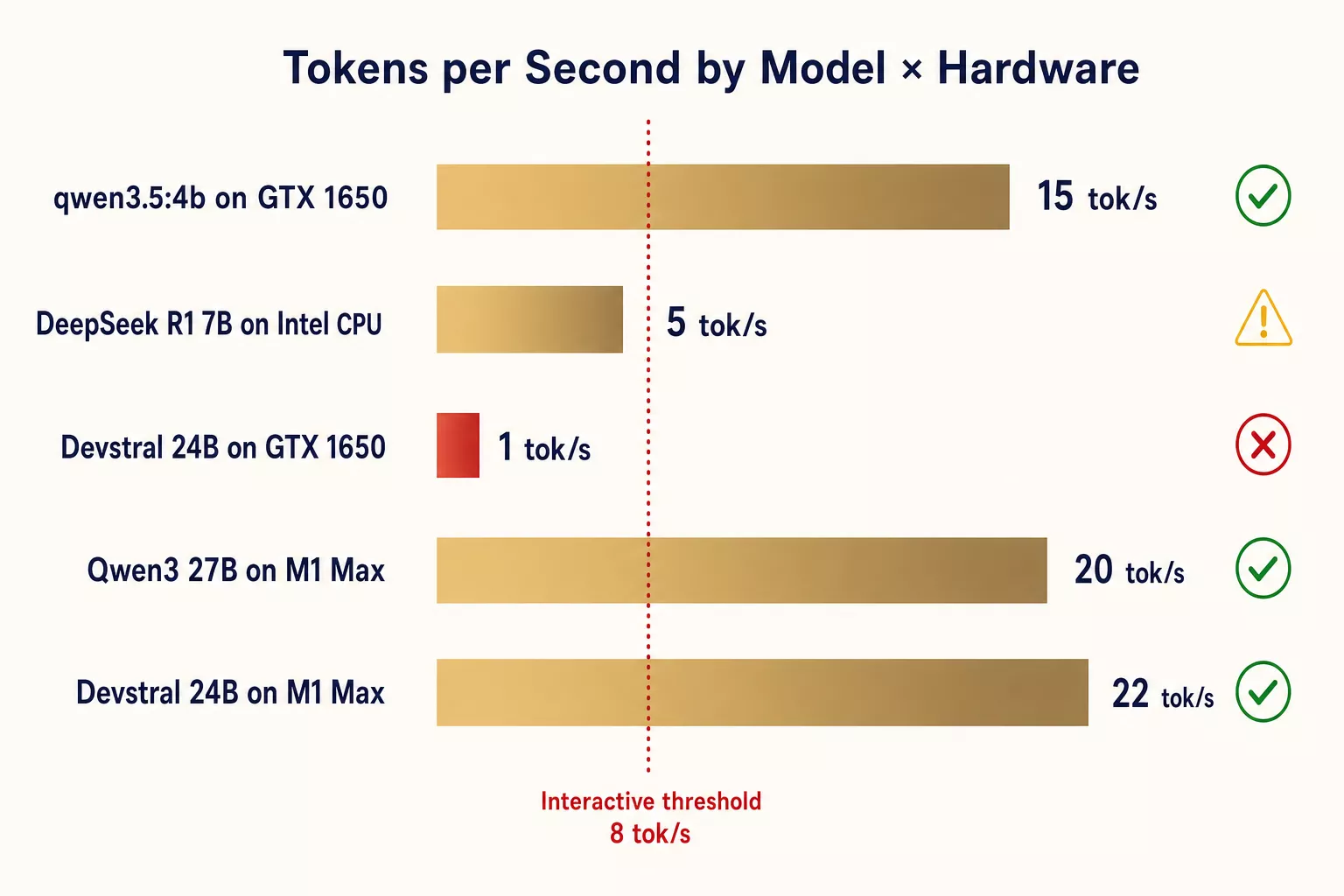
| Node | Model | Size | Warm Speed | Cold Start | Memory Used |
|---|---|---|---|---|---|
| Linux (i7 + GTX 1650) | qwen3.5:4b | 3.4GB | ~15 tok/s | ~5s | 3.4GB (mostly VRAM) |
| Linux (i7 + GTX 1650) | devstral:24b | 14GB | ~1 tok/s ❌ | ~180s | 14GB (2.8 VRAM + 11 RAM) |
| MBP3 (Intel i7, 16GB) | deepseek-r1:7b | 4.7GB | ~5 tok/s | ~4s | 4.7GB RAM |
| MBP1 (M1 Max, 64GB) | qwen3:27b | 17GB | ~20 tok/s* | ~8s* | 17GB unified |
| MBP1 (M1 Max, 64GB) | devstral:24b | 14GB | ~22 tok/s* | ~6s* | 14GB unified |
*Estimated based on M1 Max Metal benchmarks. MBP1 deployment pending.
Key observations:
- Cold start matters. The first request to a model loads it into memory. Ollama keeps models loaded for 5 minutes by default. Factor this into your routing — frequently-used models stay warm, rarely-used ones pay the cold start tax.
- Token speed isn't everything. DeepSeek R1 at 5 tok/s sounds slow, but for background reasoning tasks where you need thorough analysis, it's fine. You're not waiting interactively — you're getting results in 30-60 seconds for a paragraph.
- VRAM is the cliff. Models that fit in VRAM/unified memory are 10-20x faster than partial offload. There's no middle ground.
Cost Analysis
| Task Category | Before (API only) | After (distributed local) | Monthly Savings |
|---|---|---|---|
| Coding sub-agents | Claude Sonnet ($3/M) | Devstral 24B ($0) | ~$60/mo |
| Document processing | Claude ($3-15/M) | Qwen3 27B ($0) | ~$40/mo |
| Quick classification | Claude ($3/M) | qwen3.5:4b ($0) | ~$30/mo |
| Background reasoning | Claude ($15/M) | DeepSeek R1 ($0) | ~$20/mo |
| Main brain | Claude Opus ($15/M) | Claude Opus ($15/M) | $0 |
| Total estimated | ~$200/mo | ~$50/mo | ~$150/mo |
The main brain stays on Claude Opus. Complex reasoning, nuanced instruction-following, and safety-critical decisions still route to the best API model. Everything else goes local.
The real win isn't the dollar amount — it's the architectural freedom. When inference is free, you can use AI for things that would be wasteful at API pricing: re-ranking every search result, classifying every incoming message, generating embeddings on every document change.
Security Considerations
Running inference servers on your network is a security surface. Here's how we lock it down:
- Firewall (ufw): Default deny all incoming. Only allow traffic on the Tailscale interface and localhost.
- SSH hardened: Key-only authentication, password auth disabled, root login disabled.
- Ollama binds to 0.0.0.0 but is only reachable via Tailscale IPs — the firewall ensures external traffic never reaches port 11434.
- No model weights exposed to the internet. All cross-node traffic goes through Tailscale's WireGuard encryption.
- API keys stored in chmod 600 files outside of any git repository or workspace.
The threat model: if someone compromises your Tailscale account, they can query your models. But they can't exfiltrate model weights (Ollama doesn't expose a download endpoint) and they can't access your system beyond what the Ollama API exposes.
What's Next
This infrastructure is the foundation, not the product. Here's what we're building on top of it:
- DevOps RAG (KRIYĀ) — a retrieval-augmented generation system for infrastructure knowledge. Ingest runbooks and incident postmortems, ask operational questions, get cited answers. The ingestion pipeline runs on Qwen3 27B locally. The retrieval runs on our existing knowledge graph (25K+ entities in PostgreSQL + Apache AGE).
- Auto-Triage (DHARMA) — from alert to diagnosis to resolution, autonomously. DeepSeek R1 handles the reasoning chain: correlate signals, hypothesize root cause, match to known patterns, suggest resolution. 5 tok/s is plenty when you're doing deep analysis, not chat.
- PDF Intelligence Agent — our existing PDF text replacer, evolved into a full document processing agent. Send a PDF with a natural language instruction ("translate to Hindi," "redact all PII," "extract all financial figures"), get the result back. Powered by local models for processing, no API dependency for sensitive documents.
Each product runs on this exact distributed architecture. No cloud GPU bills. No vendor lock-in on inference. And when better open-source models drop — and they keep dropping — we pull the new weights and move on.
This is the infrastructure layer of Avyay's Intelligence Platform — enterprise AI for autonomous agents, knowledge graphs, and intelligent workflows that do not decay.
If you're building distributed AI infrastructure or want to see these products in action, get in touch.